Protect your privacy.

Call us: 941-265-2739 | M-F 8am - 8pm CST

˄
˅
Product image

Secure options. Which one is best for you?

More Secure options
Ask a specialist call chat

Galaxy AIis here

Welcome to the era of mobile AI. With Galaxy S23 Ultra in your hands, you can unleash whole new levels of creativity, productivity and possibility —starting with the most important device in your life. Your smartphone. 123

Epic, just like that.

 CIRCLE TO SEARCH

Circle it, find it. Just like that

Search like never before with Circle to Search. Simply trace an object to get Google Search results. No typing required.4

*Image simulated for illustrative purposes. Actual UI may be different.

\"Circle
\"\"

A blog page is open in a web browser app. S Pen is used to long press the Home button. A Google overlay appears over the app. S Pen is used to circle text on the blog page: Tornado Potato. Search results for tornado potato appear in a popup over the app. S Pen is used to drag the results upward into a full screen of Google search results.

 LIVE TRANSLATE

The easiest way to communicate

Get real-time interpretation while you\'re on the phone. Speak in your own language and it’ll get translated on their end, too.5

*Image simulated for illustrative purposes. Actual UI may be different.

\"\"

A phone call is translated in real time. The dialogue is shown on screen as a text conversation in two languages.

 INTERPRETER

An Interpreter in your pocket

Want to ask a local for a recommendation? Don\'t worry! There\'s an interpreter in your pocket. Enjoy it even in airplane mode with no Wi-Fi.6

*Image simulated for illustrative purposes. Actual UI may be different.

\"\"

A photo is being edited. The subject is selected, then resized and moved to another location in the picture. Then, missing areas are filled in.

 PHOTO ASSIST

Resize it, retouch it. Just like that

New AI editing options let you get the photo you wanted, letting you relocate objects and intelligently fill in the space they left behind.7

*Image simulated for illustrative purposes. Actual UI may be different.

\"\"

A photo is edited in the Gallery app. An edit button is tapped and one of the subjects is selected. They are moved to another location in the picture. Then, missing areas are filled in.

Try Galaxy on your phoneScan this QR code or visit trygalaxy.com
\"QR

More innovation, less footprint
\"\"\"\"

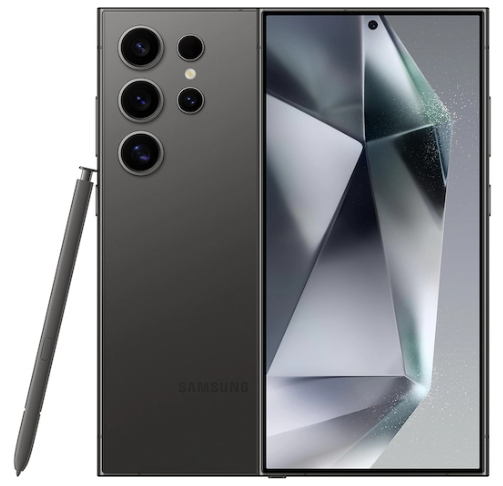
The upper half of Galaxy S23 Ultra in Phantom Black comes in from above showing the Rear Camera. The corner of the screen of a second S23 Ultra fans out from under it. The matching S Pen for both phones also emerges from underneath next to the upward-facing phone.

We’re proud to design devices that support what you support — pursuing your passions in a more sustainable world.

COLORS

Down to earth tones

Made in part with natural dyes, each tone is elegant and elevated, yet completely down to earth.8

For bolder choices, explore exclusive colors on samsung.com.9

Two Galaxy S23 Ultra phones in Green. One stands upright and is seen from the rear. The other phone is seen from the side to show the floating camera design.

\"\"
\"\"

Two Galaxy S23 Ultra phones in Phantom Black. One stands upright and is seen from the rear. The other phone is seen from the side to show the floating camera design.

\"\"
\"\"

Two Galaxy S23 Ultra phones in Lavender. One stands upright and is seen from the rear. The other phone is seen from the side to show the floating camera design.

\"\"
\"\"

Two Galaxy S23 Ultra phones in Cream. One stands upright and is seen from the rear. The other phone is seen from the side to show the floating camera design.

\"\"
\"\"

Two Galaxy S23 Ultra phones in onlie exclusive color. One stands upright and is seen from the rear. The other phone is seen from the side to show the floating camera design.

\"Four
\"\"

MATERIALS

Designed with our planet in mind

Crafted in part with recycled glass and ocean-bound plastic, each phone comes in a recycled paper box.10,11

\"\"
  • 01RECYCLED GLASS
  • 02RECYCLED PET FILM
  • 03RECYCLED GLASS
  • 04RECYCLED OCEAN-BOUND PLASTICS PEN INNER COVER

S PEN

Note\'s signature tool comes built in

S Pen keeps the legacy of Galaxy Note alive. Capture scribbles, strokes of genius and everything in between with the built-in S Pen. You can even use it to snap pics without needing to set a selfie timer.

\"A
  • 01MORE WAYS TO EXPRESS

    Express yourself with pinpoint precision. S Pen lets you doodle directly on photos and make more accurate edits. Quickly jot down messages and convert your handwriting to text.

    *Do not apply excessive pressure to the screen with the S Pen, as doing so may cause screen damage.

    *Image simulated for illustrative purposes. Actual UI may be different.

    \"Two
  • 02DO MORE WITH EVERY PEN STROKE

    Any pen can write words, but S Pen goes beyond. Highlight and save info to your calendar, snap pictures as a remote camera button and even translate text on the go.

    *Image simulated for illustrative purposes. Actual UI may be different.

    \"Two

\"Can you send me that?\"
\"Galaxy

Get ready to become your group\'s go-to photographer. We\'ve packed Galaxy\'s biggest sensor, light-absorbing pixels and video stabilization technology into one epic camera for life\'s most share-worthy moments.

\"\"
Front Camera
  • 12MP

    Selfie Camera

Rear Camera
  • 12MP

    Ultra-Wide Camera

  • 200MP

    Wide-Angle Camera

  • 10MP

    10x Optical Zoom Telephoto Camera 1

  • 10MP

    3x Optical Zoom Telephoto Camera 2

GALLERY

Capture share-worthy moments
\"A

#withGalaxy

NIGHTOGRAPHY

Low light. Camera. Action.
\"A

WIDEf2.2

#withGalaxy

Take crisp photos and videos, no matter the lighting. Galaxy\'s most advanced camera sensor and fastest processor reduce noise in low light for stunning shots.

  • 01NIGHT PORTRAIT

    This camera delivers on depth and dimension. Gently blur the background to put your friends in focus and let incredible details shine.

    \"Nightography

    3xf2.4

    #withGalaxy

    \"\"

    WIDEf1.7

    #withGalaxy

  • 02NIGHT VIDEO

    Hit record to capture crisp, detail-rich scenes. Steady video is incredibly easy with innovative technology that keeps your scenes looking cinematic, even in low light.

    \"\"\"\"

    A guitarist plays with her band at an outdoor venue at night with lights from tall skyscrapers in the background. Even with dim lighting, the colors are vibrant and the picture quality is sharp. The video was recorded with Galaxy S23 Ultra.

    #withGalaxy

  • 03ASTRO HYPERLAPSE

    Transform a starry sky into a work of art. Turn on Hyperlapse to record timelapses with bright clarity, speeding up minutes of footage into stunning seconds.

    \"\"\"\"

    A hyperlapse of a starry sky captures shooting stars and the constellations slowly rotating as the night progresses. The video was recorded with Galaxy S23 Ultra.

    #withGalaxy

HIGH RESOLUTION

200MPwow-worthy resolution
\"A

WIDEf1.7

\"\"

#withGalaxy

We nearly doubled the resolution on the Wide-Angle Camera,12 delivering images so clear you can zoom way in to find hidden masterpieces. Then crop and create whole new compositions from your existing shots.

Working behind the scenes of every shot is an all-new adaptive pixel sensor for a Gallery of vibrant, crisp 200-megapixel photos in any light.

EXPERT RAW

RAW power. From snap to edit.

Switch into Expert RAW to finesse in greater detail.13 Snap in 50MP for detailed, dynamic frames, or expand your repertoire with astrophoto, Multiple exposures and other exposure features.

Power for those who don\'t pause
\"\"\"\"

Gameplay of a racing video game. The details of the vehicles and track surroundings are clear and the movement is smooth.

Game at full throttle and smoothly switch between apps with our fastest processor ever.

*Wreckfest available for purchase and download in the Samsung Galaxy Store app. Content is generally suitable for ages 13 and up. May contain violence, suggestive themes, crude humor, minimal blood, simulated gambling and/or infrequent use of strong language. Wreckfest ©2022 THQ Nordic AB, Sweden. Wreckfest is a registered trademark of THQ Nordic AB, Sweden. All rights reserved. All other trademarks, logos, and copyrights are property of their respective owners.

*Image simulated for illustrative purposes. Actual UI may be different.

World’s fastest Snapdragon14

Snapdragon® 8 Gen 2 Mobile Platform for Galaxy

\"QUALCOMM

*Snapdragon is a product of Qualcomm Technologies, Inc. and/or its subsidiaries.

*Snapdragon is a trademark or registered trademark of Qualcomm Incorporated.

BATTERY

Bring on the
boss battles

Meet the long-lasting battery made to fuel your victories. This intelligent 5000mAh (typical) battery saves power for go time, so you can game and stream into the night.15,16

*Image simulated for illustrative purposes. Actual UI may be different.

\"\"

DISPLAY

A bright future
in sight

Dynamic AMOLED 2X delivers clear, colorful details on screen, whether dimmed low or on full brightness. 120Hz technology intelligently optimizes the refresh rate to smooth out action and save on battery.

*Image simulated for illustrative purposes. Actual UI may be different.

\"\"

FOR BUSINESS

Epic performance for work
Power through your workday with our fastest mobile processor ever.

SMART SWITCH

We make keeping your data easy

Transfer all the content you love — photos, calendar dates and even call history — from your old phone to your new Galaxy S23 Ultra.17,18

*Image simulated for illustrative purposes. Actual UI may be different.

How to switch to Galaxy S23 SeriesHow to switch to Galaxy S23 Ultra, available with One UI 5.1. An older Galaxy S Series device seen from the front, and a new Galaxy S23 Ultra in Green seen from the rear. Its box is next to it. The Galaxy S23 Ultra rotates to show the display and the built-in S Pen leans on its side. Disclaimer: Video simulated for illustrative purposes. Actual UX/UI may be different. Icon layout may vary depending on home setting or the size of your device. Turn 3 steps into 1 when switching to Galaxy S23 Ultra. Three icons, each representing Samsung Account, Google account, and Wi-Fi settings, along with their respective passwords merge into one QR code icon. Disclaimer: Quick Setup supported only for Galaxy S23 series models running One UI 5.1 or later. Previous devices should run Android M or later. Transfer your Samsung account, Google account and Wi-Fi settings at once. To the side, Smart Switch’s Quick Setup interface is shown on a Galaxy S23 Ultra screen. Disclaimer: Video simulated for illustrative purposes. Actual UX/UI may be different. Quick Setup supported only for Galaxy S23 series models running One UI 5.1 or later. Previous devices should run Android M or later. Tap Set up to create a QR code. The previous device is shown on the left and Galaxy S23 Ultra on the right. The screen on the previous device prompts to Set up Galaxy S23 Ultra with a “set up” button at the bottom. On the Galaxy S23 Ultra screen, it prompts to Set up using another device with a button for Galaxy or Android devices and a button for iPhone or iPad. Scan the QR code on Galaxy S23 Ultra with your previous device. Complete verification to proceed. The previous device is used to scan the QR code, then verify with a pattern lock. Continue with Smart Switch to transfer your apps and home screen. Disclaimer: Data transferring via Smart Switch requires all devices to install the Smart Switch app and run Android M or later. Wired transfers require at least Android 4.3 iOS 5 or older and Android OS must use wireless transfer options. App icons float from the previous device’s screen into the Galaxy S23 Ultra screen to represent the transfer of data to the new phone. The transfer completes and a button to go to the Home screen appears. Disclaimer: Some contents, data or downloaded apps may not transfer via this process. The amount of time required may vary depending on the data and your connection’s strength. Video simulated for illustrative purposes. Actual UX/UI may be different. Now, switch fast and easy. Both screens now show the same Home screen wallpaper, apps and widgets. Disclaimer: Icon layout may vary depending on home setting or the size of your device. Video simulated for illustrative purposes. Actual UX/UI may be different. Galaxy S23 Ultra seen from the rear with built-in S Pen in front. Disclaimer: S Pen embedded only in Galaxy S23 Ultra. Samsung dot com. Samsung logo.

\"The

TRADE-IN

Trade in to trade up

Swap the phone you have for the Galaxy you want. See how much you could save on a new Galaxy S23 Ultra.θ

*Terms and conditions apply. Availability may vary by country or region.

\"An

PC CONTINUITY

Multi Control makes multitasking easier

When the ideas are flowing, sync your phone and PC for a 2-for-1 experience. Without switching your mouse, keyboard or touchpad, you can drag and drop, copy and paste and type on both devices for your most efficient screentime yet.19,20

*Image simulated for illustrative purposes. Actual UI may be different.

How to use Multi controlGalaxy S23 Ultra seen from the rear and Galaxy Book3 Ultra seen closed and from the front. Galaxy S23 Ultra rotates and Galaxy Book3 Ultra opens to show their displays. An S Pen leans on the Galaxy S23 Ultra. The screens of the two devices both show the same photo gallery. How to use Multi Control. Disclaimer: Galaxy Book3 Ultra sold separately. Multi Control requires updated phones with One UI 5.1 or above and Galaxy Book series devices released in 2021 or later with Samsung Settings v1.5 (Intel) or Samsung Settings v3.3 (ARM). Video simulated for illustrative purposes. Actual UX/UI may be different. Start building epic moments on your Galaxy S23 Ultra. On the side, a series of colorful nighttime photos scroll by on the screen. The photos then appear on the screen of Galaxy S23 Ultra in the Gallery app. Disclaimer: Video simulated for illustrative purposes. Actual UX/UI may be different. Then, a laptop appears next to the device. On its screen is a photo from the device’s gallery being edited in Adobe Premiere Pro. Expand those epic moments to Galaxy Book3 Ultra with Multi Control. Shown with Adobe Premiere Pro. Disclaimer: Adobe product screenshots reprinted with permission from Adobe. Adobe Premier Pro must be downloaded separately. Multi Control requires updated phones with One UI 5.1 or above and Galaxy Book series devices released in 2021 or later with Samsung Settings v1.5 (Intel) or Samsung Settings v3.3 (ARM). Video simulated for illustrative purposes. Actual UX/UI may be different. Make sure you have the same Samsung account, Bluetooth and Wi-Fi on. On the Galaxy S23 Ultra screen, the Connected devices settings are open and the Multi control toggle is activated. Disclaimer: Network or Wi-Fi connection is required and Wi-Fi direct is also available. Each device must be registered with a single Samsung Account. Some models may have limited feature support. Video simulated for illustrative purposes. Actual UX/UI may be different. Connect your Galaxy S23 Ultra to Galaxy Book3 Ultra. Next to the Galaxy S23 Ultra, a laptop appears. Over its screen, a popup for Multi control shows that the laptop and smartphone are connected. Then, a settings popup for Multi control allows Multi control to be activated so that the Galaxy Book’s mouse and keyboard can control a nearby Galaxy phone or tablet. Below the on off toggle is the setting to arrange the positioning of the two devices screens relative to one another. A mouse drags the mobile screen from one side of the laptop screen to another. Disclaimer: Bluetooth and Wi-Fi connection required. Each device should be registered with a single Samsung Account. Video simulated for illustrative purposes. Actual UX/UI may be different. Start using Multi Control. Galaxy S23 Ultra and Galaxy Book3 Ultra are side by side and seen from the front. Disclaimer: Some models may have limited feature support. Video simulated for illustrative purposes. Actual UX/UI may be different. Use the same mouse or touchpad to drag and drop. The two devices are shown with the photo gallery open on the smartphone and a file viewer window on the laptop. The mouse from the laptop screen seamlessly moves to the screen of the smartphone and selects multiple photos in the gallery, then drags and drops them into the file viewer on the laptop. Then, the photos are shown with Adobe Premiere Pro. Disclaimer: Adobe product screenshots reprinted with permission from Adobe. Adobe Premier Pro must be downloaded separately. Some models may have limited feature support. Video simulated for illustrative purposes. Actual UX/UI may be different. Then, a video file from the laptop is selected and dragged over to the smartphone screen and shared in a text message conversation. Disclaimer: Drag and drop feature available on select file types. Some models may have limited feature support. Video simulated for illustrative purposes. Actual UX/UI may be different. Use the same keyboard to type. Disclaimer: Some models may have limited feature support. Video simulated for illustrative purposes. Actual UX/UI may be different. Galaxy S23 Ultra and Galaxy Book3 Ultra are side by side and seen from the front. A text message conversation is open on the smartphone and the file viewer is open on the laptop. The keyboard of the laptop is used to type a message into the text box on the smartphone. It types out, “Here you go. Let me know what you think!” and sends the message. Next, Multitasking meets Multi Control. Galaxy S23 Ultra seen from the front with the built-in S Pen on the side and Galaxy Book3 Ultra open and seen from the front. Both displays show the same photo, and it is shown with Adobe Premiere Pro on the laptop screen. Disclaimer: Adobe product screenshots reprinted with permission from Adobe. Adobe Premier Pro must be downloaded separately. Video simulated for illustrative purposes. Actual UX/UI may be different. Galaxy S23 Ultra seen from the rear with built-in S Pen in front. Disclaimer: S Pen embedded only in Galaxy S23 Ultra. Samsung dot com. Samsung logo.

\"The

ONE UI

Your Galaxy, the way you like it

Now it\'s easier than ever to set your phone up just for you. One UI maximizes customization, allowing you to pick almost every detail, including video lockscreens and custom widgets.

*Image simulated for illustrative purposes. Actual UI may be different.

\"Galaxy

SAMSUNG WALLET

Welcome to your new digital life

Samsung pay is now Samsung Wallet. Get ready to do more from the convenience of your phone, like securely store payment cards, digital keys, crypto and more.21

*Image simulated for illustrative purposes. Actual UI may be different.

\"An

SAMSUNG HEALTH

Wellness done your way

Begin your personal health journey by connecting Galaxy Watch5 Pro to your phone.22 Track your sleep, exercise, body composition and more in the Samsung Health app.23,

*Products sold separately.

*Image simulated for illustrative purposes. Actual UI may be different.

*GPS route feature only available on Galaxy Watch5 Pro.

*Requires GPX-format route file to be imported for hiking or cycling and route to be set as target in Samsung Health settings.

\"A